
You have a reseller network. Do you actually know what's happening inside it?
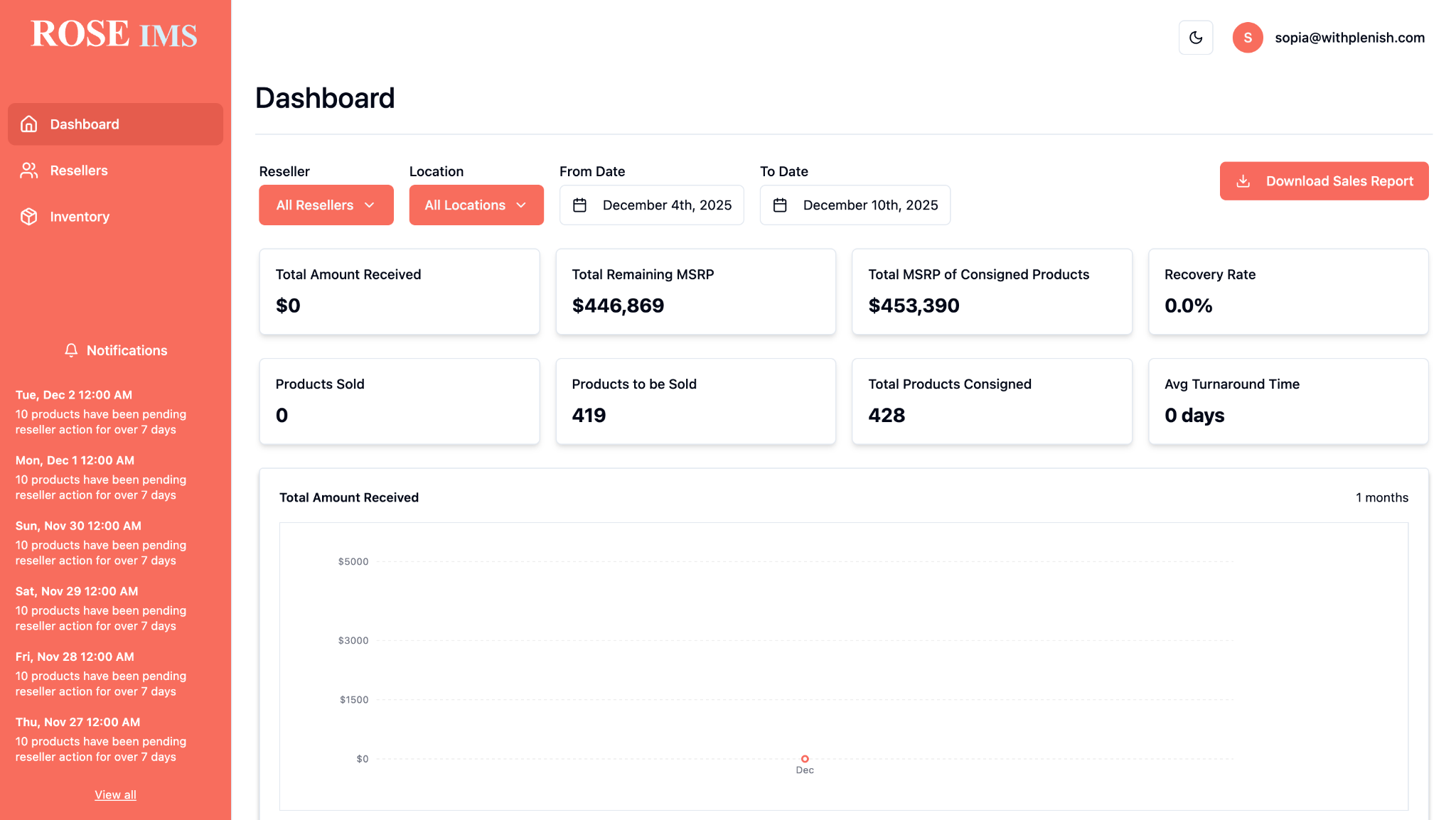
ROSE Connect gives brands full visibility into their reseller network — inventory assignment, sell-through tracking, payment reconciliation, and accountability — all from one platform.
Direct-to-consumer works for some brands. For others, it creates more problems than it solves.
Going DTC means managing fulfilment, customer service, and returns at scale — while risking the relationships with the retailers and dealers who already sell your product. For most furniture and appliance brands, the reseller channel isn't going away. The question is whether you can actually manage it.
Right now, most brands can't. Inventory gets assigned to resellers and disappears into a black box. You don't know if it sold, if it's still sitting, if it was damaged, or if payment is coming. ROSE Connect closes the loop — without disrupting the channel relationships that matter.
The reseller loop, measured instead of guessed.
ROSE Connect turns assignment, acceptance, sell-through, and payment into one visible operating rhythm.
See where inventory is moving — and where it is stuck.
Each reseller action updates the brand view, so teams can follow the full path from assigned stock to reconciled payment.
Five steps, full loop.
Upload inventory
The brand uploads clearance inventory to the ROSE Connect dashboard — items, condition, photos, and pricing.
Assign to resellers
Select which resellers in your network receive which items. Assignment is intentional — not a spray-and-pray approach.
Reseller accepts
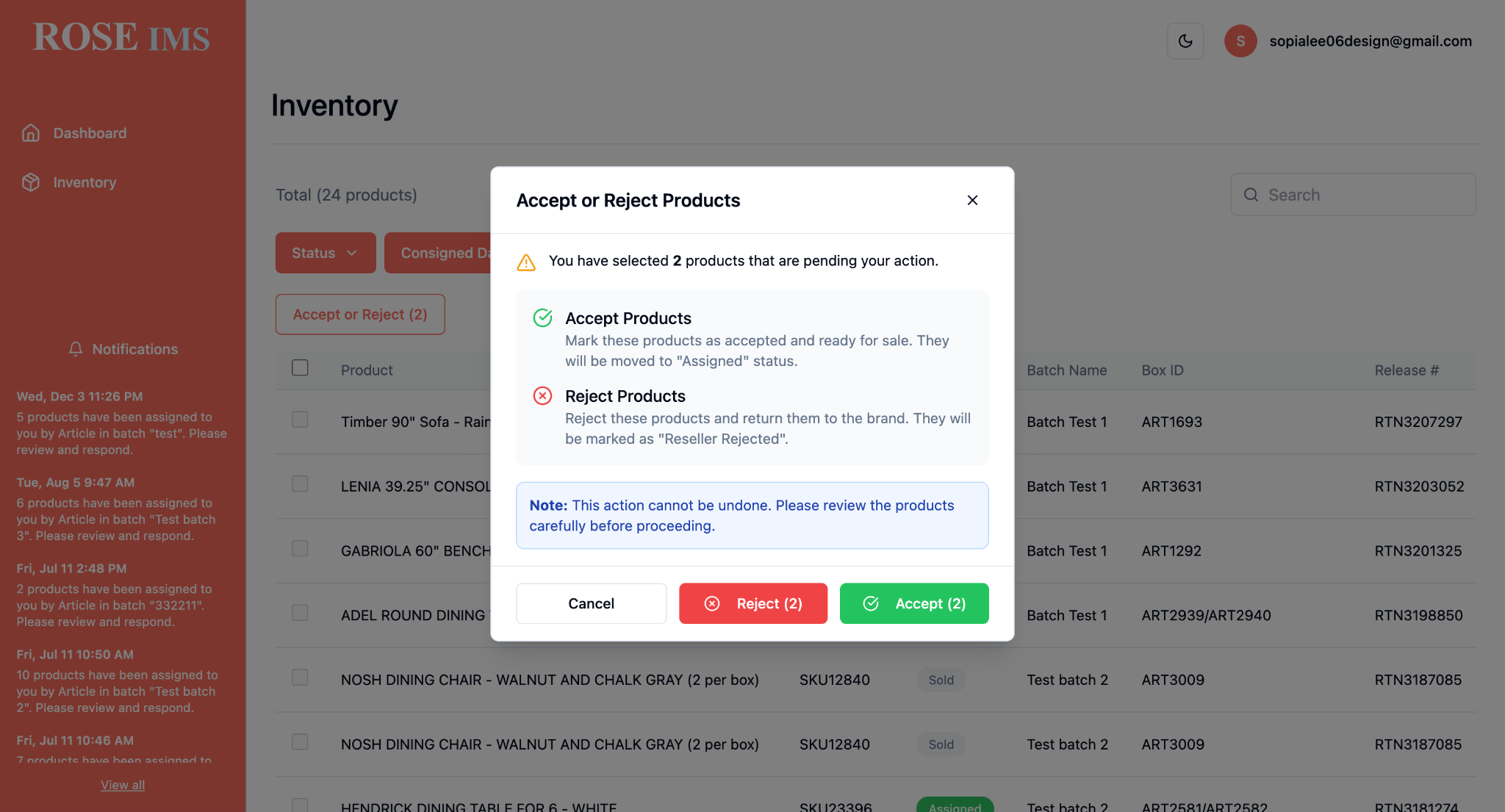
Resellers log into their own dashboard, see their assigned inventory, and confirm acceptance. Unaccepted items auto-unassign after 3 days.
Track sales in real time
As resellers update item statuses, the brand dashboard reflects sell-through in real time. No more black boxes.
Payment reconciliation
Payment obligations are tracked against sold inventory. Reconciliation happens in the platform — not via email chains and spreadsheets.
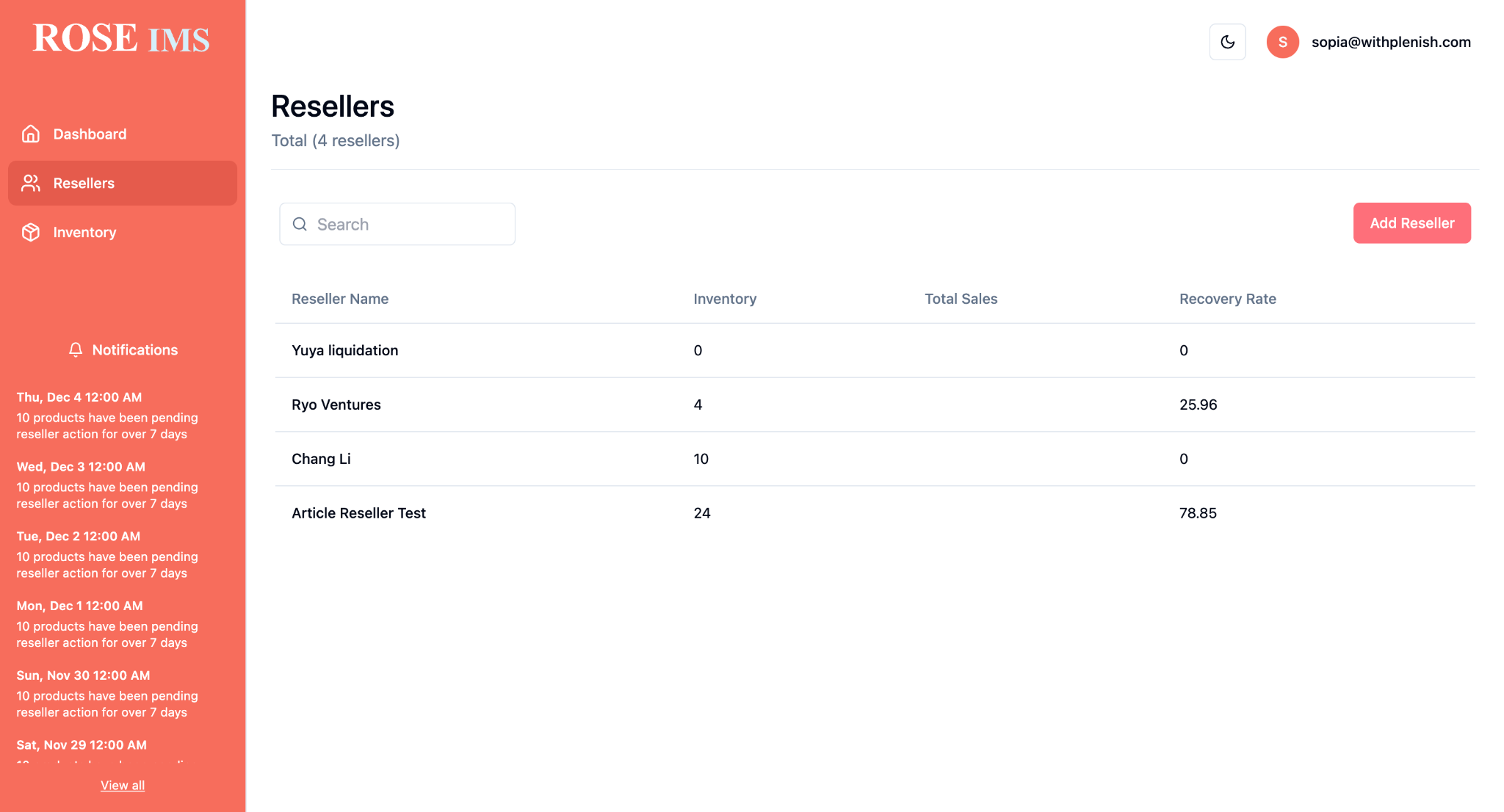
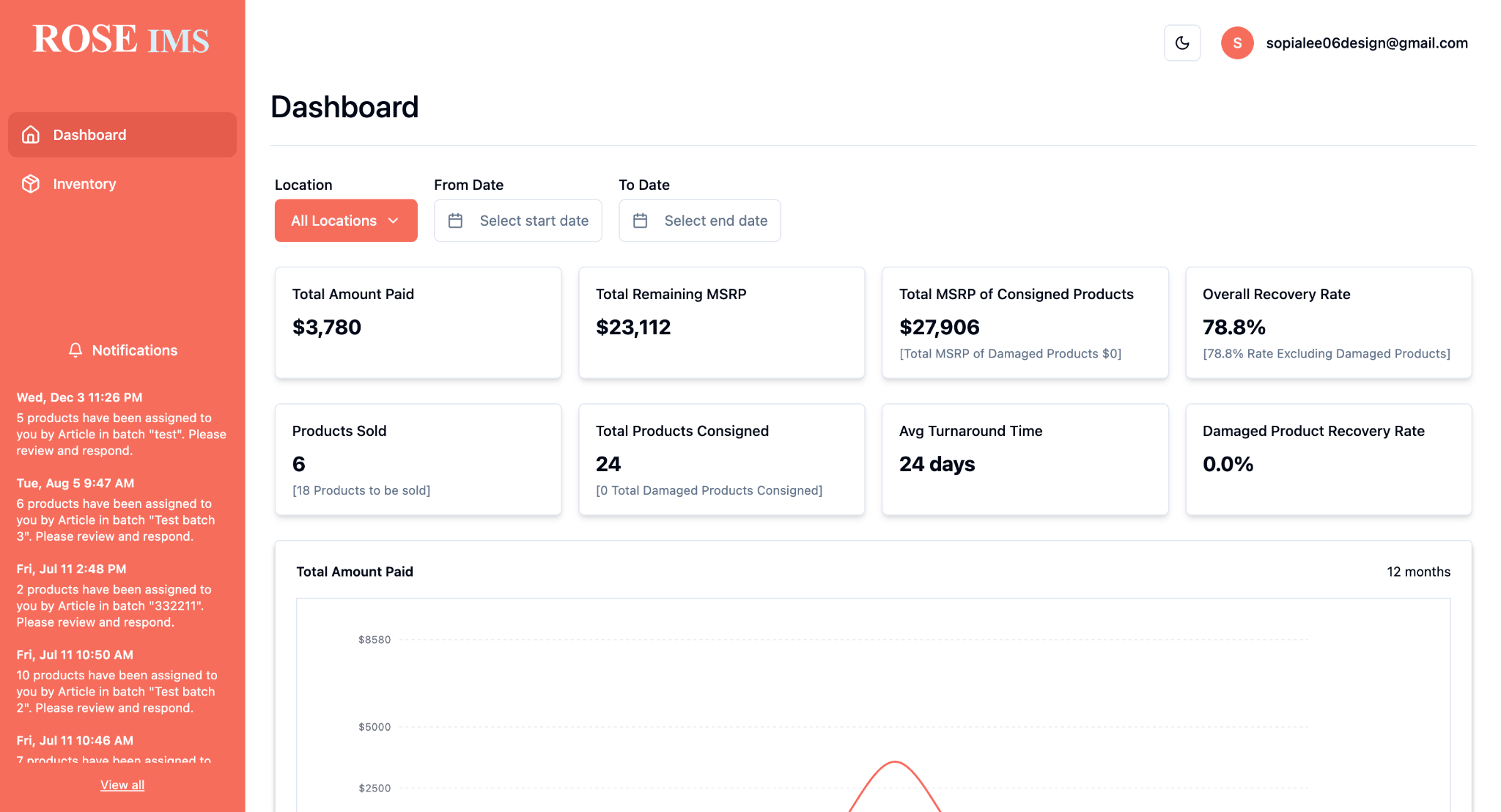
One platform. Two dashboards. Full picture.
Both the brand and each reseller have their own view — designed for what they actually need to see.
Brand dashboard
For the brand managing the network
- Full network overview — all resellers, all inventory
- Assign and unassign inventory by reseller
- Real-time sell-through tracking
- Payment reconciliation tracking
- Damaged and disputed inventory management
Reseller dashboard
For each reseller in the network
- View assigned inventory from brands
- Accept or decline inventory assignments
- Update item status (received, listed, sold)
- Track payment obligations
- Report damaged or disputed items
What changes when you can actually see your network.
Full visibility
Know where every item is, what its status is, and which reseller has it — at any moment.
Accountability
Resellers confirm receipt, update statuses, and log sales. No more "we never received it" situations.
Payment reconciliation
Stop chasing payments across email threads. Payment obligations tie directly to logged sales in the platform.
Better tools for resellers
Resellers appreciate having a proper system. It makes them better partners, not just channel members.
No channel conflict
Because you're managing the reseller channel — not bypassing it — existing relationships stay intact.
What's included in ROSE Connect.
Brand dashboard includes
- Inventory upload and catalogue management
- Reseller directory management
- Inventory assignment by reseller
- 3-day auto-unassign for unaccepted inventory
- Real-time sell-through reporting
- Payment reconciliation dashboard
- Damaged item dispute workflow
- Per-reseller performance reporting
- Inventory status audit trail
- Bulk item upload via CSV
- Email notifications for key events
- Multi-user team access with roles
Reseller dashboard includes
- View assigned inventory from all brand partners
- Accept or decline inventory with one click
- Update item status (received, listed, sold, returned)
- Track outstanding payment obligations
- Report damaged or disputed items with documentation
- Sales history and item performance log
The details that make it work.
Reseller onboarding
Resellers are invited by the brand via email. They create a simple account, accept the terms, and they're live. No lengthy setup, no IT involvement. Most resellers are onboarded in under 10 minutes.
3-day auto-unassign
Inventory assigned to a reseller that isn't accepted within 3 days is automatically unassigned and returned to the brand's available pool. This keeps inventory moving and prevents items from getting lost in the process.
Damaged inventory workflow
If a reseller receives an item in damaged condition, they can flag it in the platform with photos and a description. The brand sees the report and can approve a credit, reject the claim, or open a dispute — all tracked in the system.
Item statuses
Every item moves through clear statuses: Unassigned → Assigned → Accepted → Received → Listed → Sold (or Returned / Damaged). Both brand and reseller always know exactly where an item stands.
ROSE Connect is built for a specific situation.
✅ Good fit if you…
- Are a brand with an established reseller or dealer network
- Have clearance or excess inventory to push through the channel
- Currently manage reseller relationships via email or spreadsheets
- Need payment reconciliation without a custom ERP project
- Want to protect existing reseller relationships (no DTC conflict)
✗ Not the right fit if you…
- Sell exclusively direct-to-consumer with no reseller relationships
- Are a retail store looking for your own clearance channel (see ROSE Direct)
- Need a marketplace for consumer-facing listings
- Require automated payment processing (reconciliation is tracking, not payment)
Running in a real network today.
A leading Canadian DTC furniture brand uses ROSE Connect to manage clearance inventory across their authorized reseller network. Before Plenish, inventory was assigned via email, tracked in spreadsheets, and payment reconciliation happened in quarterly calls. Now the entire cycle runs through one platform — from initial assignment to final payment log — and the brand has visibility they've never had before.
— Genericized for client confidentiality
Flat monthly rate. Unlimited resellers. No per-item or per-transaction fees.